Databender & Building Big Programs
This blog post won’t be about why I think VR programs can be useful and important, since I’ve already written about that on the Odachi about page, instead this will be more of a breakdown of everything that goes into making a complete image editing application on a weird OS platform without much vendor support. The java stuff should be interesting, at least!
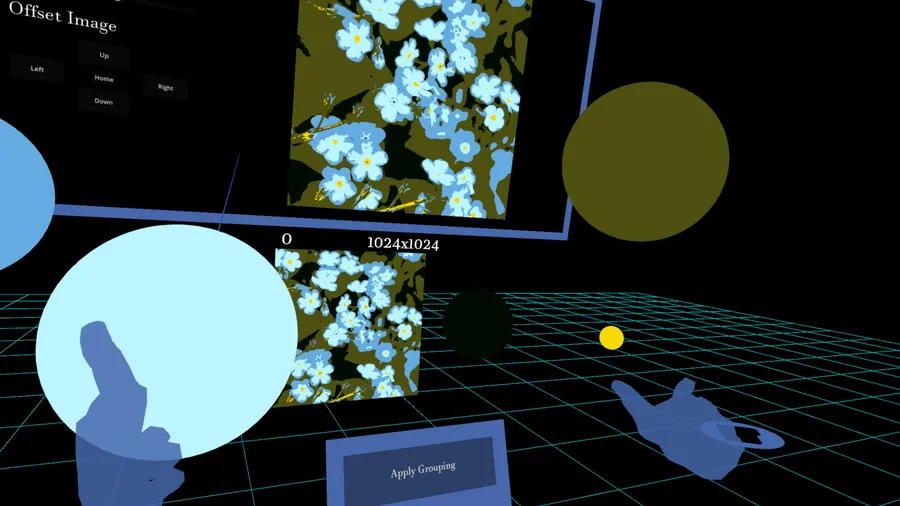
For a brief description of what Databender is, it is a VR program that lets you load pictures from the Quest (VR headset) filesystem into a 3D environment, where the chunks of data can be picked up and “bent” through a variety of novel user interaction schemes. In the image below, a flower image has been loaded and is currently in one 1024x1024 chunk. Then, the user chose a posterize option, which groups colors in the chunk into spheres based on a tolerance. The user can then merge these spheres with each other to increase the amount of that color in the image, while getting rid of the other color. It’s complex, but in order for these editing tools to be useful in VR, they have to add more complexity that is only intuitive to 3 dimensions.
To get into technicalities, Databender is built with Godot, a free and open source game engine. While it has a good base set of features for VR, it also has a few great, community maintained libraries that help handle a lot of the common setup objects. These are useful for things like 2D viewports in 3D space, or prefabs for making grab points. Since you can find all of those on the Odachi blog posts, I won’t go into them here. But the one thing I will say is that having easy access to the source code of these prefabs was so helpful for a weird application like these. That was a big challenge in Unity. When something doesn’t work, most of the time it’s a huge pain to try and figure out what is broken, much less try to add new functionality. Godot makes this much easier.
The first major problem actually relating to the function of this app was creating an algorithm to break images up into chunks, and how to apply some of the effects to the underlying data. This is a place where I don’t think I had the best solution. I chose to load image data as a 1D byte array, where each pixel starting from top left, all the way to bottom right, is stored in a chunk in an array. There are some clear problems with trying to write an easy algorithm to process this chunk array into different chunks of an image. The solution I came to was traversing the array and first breaking each chunk into a 2D array with rows and columns, then storing those in another array of all the chunks together.
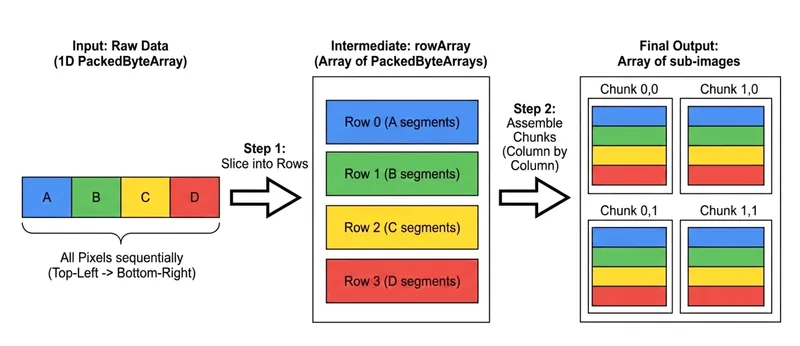
To try and address the performance problems with this solution, I wrote a C++ plugin for Godot to process image edits and chunking. While this was a fun detour into learning C++, and did slightly improve performance, there is still more work that needs to be done here. Calculating a way to stride across the linear array in one pass, for example, is a necessary upgrade. Being able to dispatch sub-image array editing tasks to the GPU would be nice, but there isn’t much documentation on how to do this for Android for Godot (that I could find). I’m sure there are more efficient solutions or algorithms than the one I just put together by hand. If you have any good reading recommendations for this type of problem, please email it my way.
One problem that even the best algorithm couldn’t solve is the problem of the app stuttering whenever you loaded a big image from the disk. This happened because (at least in Godot 4.5), the visual rendering thread is not separate from the rest of the game logic. This is especially bad for virtual reality apps, since even the smallest stutter can disorient the user. Solving this required adding concurrency to the app with multithreading.
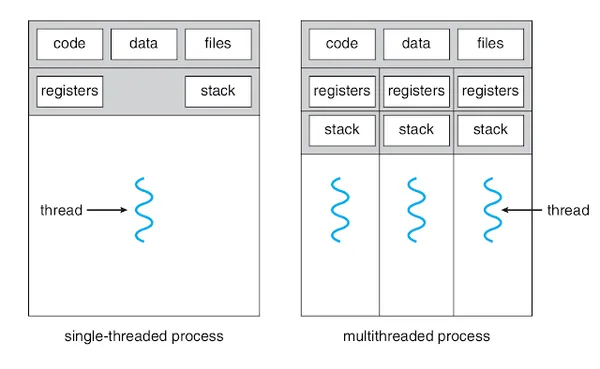
Each time an image operation needed to happen, a worker thread could be dispatched, locking the appropriate image chunk resource while the user just saw a loading indicator, but critically still got new frames. When the thread hit its callback, it could tell the game engine to re-render the image preview, and terminate. Of course, some code was also required to handle if a thread died and mismanaged data, otherwise the user would be waiting forever. This was done with some careful exception handling code inside of the threaded functions.
However, another issue arose when trying to save images to the Android filesystem: Godot doesn’t notify the Android media scanner when it saves an image, so although the actual file was there on the filesystem, the user couldn’t see it in the gallery apps. After some research, I realized that fixing this typically required some Java code that could call the Android API in order to notify the media scanner. While the community of Godot had already built support for Kotlin plugins in Godot, they had also come up with an even better solution: JavaClassWrapper!
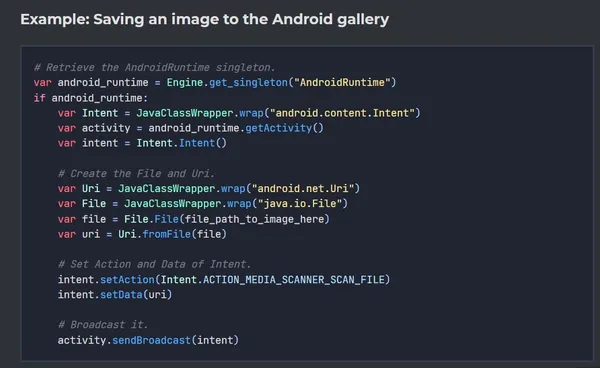
Above is the actual code that I ended up writing to solve this issue, and it worked so well that it was actually accepted into the official tutorial for using JavaClassWrappers in Godot! You can pretty easily see what is happening with this feature: in Godot’s pythonic interface, you are able to “wrap” the Java Native Interface and call functions just like you would in normal Java. This makes it totally easy to inform the media scanner of what happened. Wrapping this code up into a function, along with the normal way of saving images, solved this problem.
While there are many more side tangents that I could go on about how this app came together, I think these three are the most critical: image processing algorithms, multithreaded applications, and using plugins to learn and interact with Java and C++ code. Each one of these things taught me so much, and learning technologies this way is why I like working on big projects like this. And this project actually ended up being useful too, it’s out on the Quest store now with some positive reviews. I might write another post someday about how the large scope of this app also taught me a lot about good object oriented programming and error handling, but that’s another post.